
Tired of navigating Admin → Themes → Preview every time you need a Shopify theme preview URL? This free Chrome Extension for Shopify — and its Mozilla Firefox Add-On for Shopify — lets you save, copy, and launch theme preview links in one click, right from your browser toolbar.
😤 The Problem Every Shopify Developer Knows
Every Shopify developer, theme designer, and store owner has wasted time on this exact workflow: open Shopify Admin → Online Store → Themes → click the three-dot menu → Preview → copy the URL from the address bar. Then do it again for the next store. And again the next day.
Shopify theme preview URLs are long, unique, and impossible to memorise:
https://yourstore.myshopify.com/?preview_theme_id=123456789There is no built-in browser tool to save and recall these per store — until this Shopify Chrome Extension and Shopify Firefox Add-On came along.
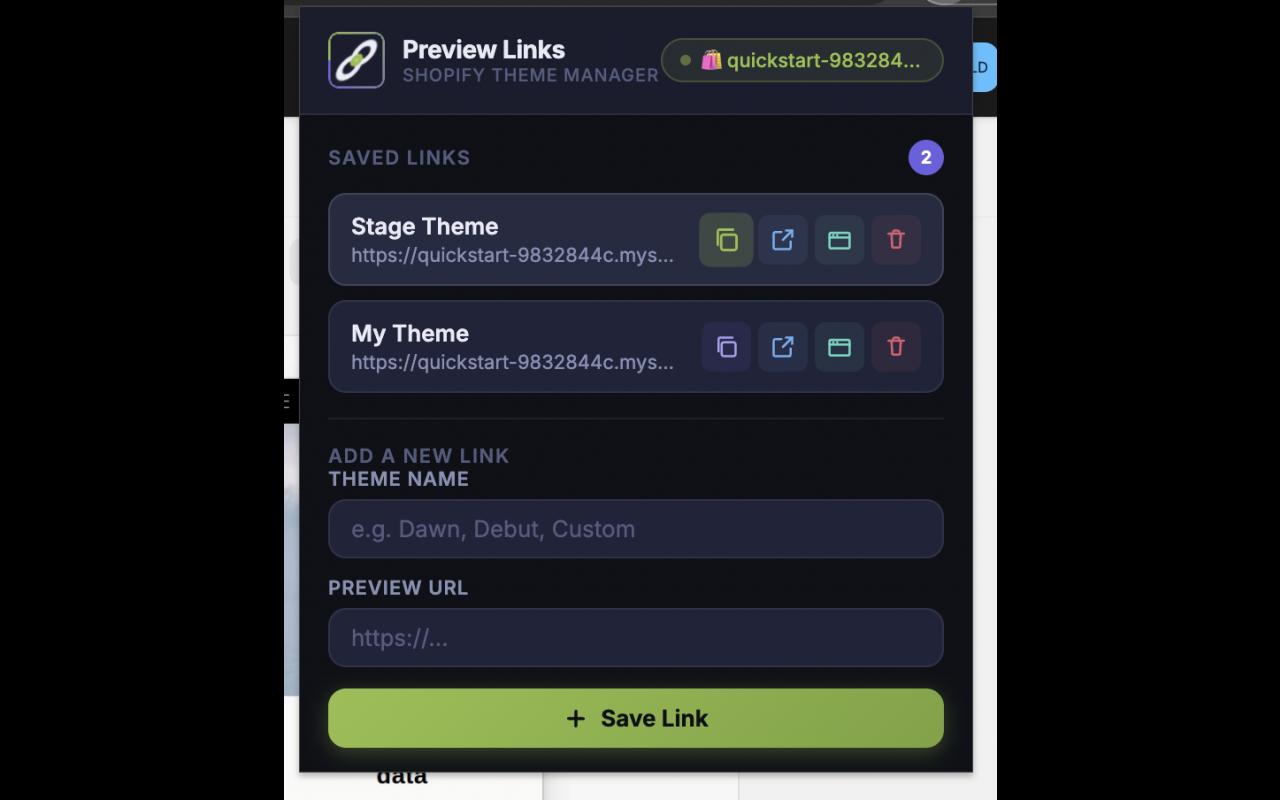
Preview Links for Shopify Stores is a free Chrome Extension and Mozilla Firefox Add-On that works as a dedicated preview link manager for Shopify themes. Save unlimited named links per store and access them in one click from your browser toolbar — no Admin navigation required.
👥 Who Is This Chrome Extension & Firefox Add-On For?
🛒 Shopify Store Owners
Test and compare themes without touching the Admin each time. Use this Chrome Extension for Shopify to keep preview links for your live theme, staging theme, and any themes under review — all one click away.
💻 Shopify Developers & Agencies
Manage client preview links across multiple stores from a single popup. Whether you use Chrome or Firefox, this Shopify browser extension eliminates repetitive Admin navigation and lets you share preview URLs with clients in seconds.
🎨 Theme Designers
Save a preview link for every iteration — “Dawn v2 test”, “Header Experiment”, “Client Approved”. Use the Mozilla Firefox Add-On for Shopify or the Chrome version and jump between theme variants instantly during design reviews.
⚡ Full Feature Breakdown
This Chrome Extension for Shopify and Mozilla Firefox Add-On for Shopify is purpose-built for one job and does it exceptionally well. Here is every feature in detail.
1. 🌐 Automatic Shopify Store Detection
The moment you click the extension icon in Chrome or Firefox, it reads your active tab and automatically identifies which Shopify store you are on — no manual input needed. It handles three URL types:
| URL Type | Example | How It’s Detected |
|---|---|---|
| Shopify Admin | admin.shopify.com/store/handle | Store handle extracted from the Admin URL path |
| myshopify.com subdomain | handle.myshopify.com | Store handle extracted from the subdomain automatically |
| Custom domain | www.yourbrand.com | Auto-detected via Shopify.shop in page scripts, or one-time manual mapping |
A live status badge at the top of the popup always confirms which store’s links you are viewing — whether you are using the Chrome Extension or the Firefox Add-On.
2. 🔗 Save Named Theme Preview Links Per Store
Add as many preview links as you need for each Shopify store. Each saved link holds:
- Theme Name — a label you choose (e.g. “Dawn 5”, “Holiday Banner”, “Client Staging v3”)
- Preview URL — the full Shopify theme preview link
Links are organised per store automatically. Switch stores, the popup updates. No filters, no manual switching — whether you are in Chrome or Firefox.
3. 📋 One-Click Copy with Visual Confirmation
Every link card has a Copy button. One click puts the preview URL on your clipboard instantly — ready to paste into Slack, email, or a client ticket. A visual “Copied” state on the button confirms it worked. No guesswork.
4. 🚀 Open in New Tab or New Window
Each saved link has two direct launch options available in both the Chrome Extension and the Mozilla Add-On:
- Open in New Tab — launches the preview URL in a new tab without closing the popup
- Open in New Window — perfect for side-by-side theme comparison across two monitors
5. 🗑️ Delete Links Instantly
Each link card has a delete button. Removing a link triggers a smooth fade-and-slide animation and the list refreshes instantly — no page reload, no confirmation dialogs in the way.
6. 🔄 Smart Custom Domain Support
Shopify stores on custom domains (e.g. www.yourbrand.com) are fully supported in both the Chrome Extension for Shopify and the Firefox Add-On for Shopify, through two methods:
- Auto-detection — the extension scans the page’s inline scripts for the standard
Shopify.shopJavaScript variable present on all Shopify storefronts and maps the domain automatically. A green “Auto-detected” badge confirms success. - Manual mapping — if auto-detection isn’t possible, a one-time prompt lets you type the store handle. The mapping is saved permanently — you never have to do it again.
7. 💾 Persistent Local Storage — Works Offline
All links are stored in the browser’s native storage.local API — the same secure mechanism used by both Chrome Extensions and Mozilla Firefox Add-Ons. This means:
- Links are available instantly, even offline
- Data survives browser restarts and extension updates
- No account, no login, no server — your data never leaves your device
- Unlimited stores, unlimited links
8. 🎨 Premium Dark-Mode UI
The popup uses a polished dark-mode interface with the Inter typeface — clean, compact, and distraction-free. Designed to get you in and out in under two seconds, whether you are using it as a Chrome Extension or a Mozilla Firefox Add-On.
🛠️ How to Use This Shopify Browser Extension
- Install the Chrome Extension for Shopify from the Chrome Web Store, or the Mozilla Firefox Add-On for Shopify from Firefox Add-Ons (AMO) — both linked below.
- Navigate to any Shopify store — admin panel,
.myshopify.com, or a custom domain. - Click the extension icon in your Chrome or Firefox toolbar. The store is detected automatically.
- Add a link — enter a theme name and paste the preview URL, then click Save Link.
- Use your links — copy to clipboard, open in a new tab, or open in a new window.
- Switch between stores freely. The popup always shows only the links for your current active store.
🔒 Privacy & Security
This Chrome Extension and Mozilla Add-On was built with a strict privacy-first approach:
- Zero data sent to any server — all storage is local to your browser
- No analytics, no tracking, no telemetry of any kind
- Minimal permissions — only
storage,tabs,activeTab,scripting, andwindows - The content script only scans for
Shopify.shopin inline scripts — it never reads form fields, passwords, or personal data
📦 Download the Free Shopify Chrome Extension & Firefox Add-On
Approved and listed on both official browser stores. 100% free, no account required.
🌐 Chrome Extension for Shopify
Download this Shopify Chrome Extension from the official Google Chrome Web Store. Also works on all Chromium-based browsers including Brave, Microsoft Edge, and Opera.
🦊 Mozilla Firefox Add-On for Shopify
Download this Shopify Firefox Add-On from the official Mozilla Add-Ons site (addons.mozilla.org). Compatible with the latest Firefox on Windows, macOS, and Linux.
❓ Frequently Asked Questions
Is this Chrome Extension for Shopify free?
Yes — completely free. No paid plans, no premium tiers, no subscriptions. Both the Chrome Extension and the Mozilla Firefox Add-On are free to install and use forever.
Does this Shopify Firefox Add-On work on custom domains?
Yes. Both the Chrome Extension for Shopify and the Mozilla Firefox Add-On for Shopify automatically detect Shopify stores on custom domains using the standard Shopify.shop JavaScript variable. If auto-detection fails, a simple one-time manual prompt lets you link the domain to your store handle permanently.
Can I manage multiple Shopify stores?
Yes. Links are stored per store automatically in both the Chrome Extension and the Firefox Add-On. When you visit a different Shopify store, the popup shows only that store’s links. There is no limit on the number of stores or links.
Will my links be saved after a browser restart?
Yes. Data is stored in the browser’s native local storage and persists across restarts and extension/add-on updates. Links are removed only when you manually delete them or uninstall the Chrome Extension or Mozilla Add-On.
Does the Chrome Extension also work on Brave, Edge, or Opera?
Yes. Because it is built as a standard Chrome Extension, it works on any Chromium-based browser. Install it from the Chrome Web Store and it runs identically on Brave, Microsoft Edge, and Opera — no extra configuration needed.
Is the Mozilla Firefox Add-On officially approved?
Yes. This Mozilla Firefox Add-On for Shopify is reviewed and officially listed on addons.mozilla.org. The Chrome Extension for Shopify is equally approved and listed on the Chrome Web Store.
Is my Shopify store data safe?
Absolutely. Neither the Chrome Extension nor the Mozilla Add-On sends any data to external servers. Everything is stored locally in your browser. There is no tracking, no analytics, and no network requests of any kind.
Stop repeating the Admin → Themes → Preview roundtrip. Install this free Chrome Extension for Shopify or Mozilla Firefox Add-On for Shopify today and get every theme preview link one click away — forever.